19 May 2026
Fabric Model Analyzer: Entreprise-scale best practices monitoring

Semantic models are the core component in Business Intelligence (BI) projects. They serve as the source for reports, dashboards, and AI outputs — including Copilot, data agents, and MCP servers.
In Microsoft Fabric and Power BI, the semantic model artifact represents much more than a dataset (as it was previously known). It also encompasses relationships between tables, field hierarchies, measures (metrics and KPIs), functions, perspectives, security rules, and more.
A well-developed semantic model follows a set of best practices for tabular modeling. As solutions grow in enterprise scenarios, one question naturally arises.
How do you keep track of best practices across multiple semantic models, especially in self-service BI environments?
The first answer to this question is the Best Practice Analyzer (BPA) ruleset. An official list of rules — covering DAX expressions, error conventions, error prevention, formatting, maintenance, naming conventions, and performance — was created by Michael Kovalsky, Principal Program Manager at Microsoft. He is also the creator of Semantic Link Labs, a Microsoft Fabric library covered in the next section.
When the BPA was first released, the recommended approach was to use it alongside the open-source community tool Tabular Editor. This tool is widely adopted, offers both free and paid versions, and remains popular in the Power BI community.
However, this process requires configuration and has meaningful limitations in terms of output and scalability. The tool must be installed locally, and the rules must either be downloaded as a JSON file and placed in the tool’s folder or loaded at runtime via a C# script in the advanced scripting window.
Once configured, the tool connects to the model — locally or remotely through the XMLA endpoint — executes the BPA rules, and outputs the results. From there, the developer can begin addressing issues or export the results as a flat file for further analysis, potentially combining output from multiple models at the same time.
This process can already be daunting for many users, and it is limited to one model at a time in a local development environment. That raises a new set of questions.
1. How can the process be simplified?
2. How can it be applied to multiple models simultaneously?
3. How can it run in a cloud environment, without depending on local tool installation and configuration?
4. How can the output be standardized and centralized for analysis and governance at enterprise scale?
Microsoft Fabric brings many experiences together on a single data platform. This includes Lakehouses for data storage and notebooks for data processing. The Fabric Model Analyzer (FMA) is a semantic model Best Practice Analyzer built entirely on those artifacts.
Being a fully cloud-based solution, FMA already answers question 3. No local tool installation or configuration is required. The only setup needed is creating the base artifacts (a Lakehouse and a Notebook) and installing the Semantic Link Labs library.
Semantic Link is a Python library native to Microsoft Fabric, maintained by Microsoft. It includes many helper functions for working within the Fabric environment and was originally designed to give data scientists easy connectivity to semantic models inside notebook experiences.
However, it quickly gained traction among data modelers, BI developers, analytics engineers and Fabric administrators, as it enables connectivity to tabular models without relying on external tools like Tabular Editor.
Semantic Link Labs is also a Python library created by Michael Kovalsky that extends Semantic Link with many additional capabilities. It includes numerous Fabric API wrappers and functions, and the most widely used features are often later incorporated into Semantic Link itself. It is important to note that Semantic Link Labs is not officially maintained by Microsoft — it is an open-source, community-driven library, similar in nature to Tabular Editor.
One of those capabilities is the BPA, which Semantic Link Labs can also apply across multiple semantic models simultaneously, answering question 2.
One of the main advantages of FMA over other approaches is the simplicity of its streamlined process. It has a clear lineage between artifacts and can be deployed quickly in any Fabric-enabled environment.
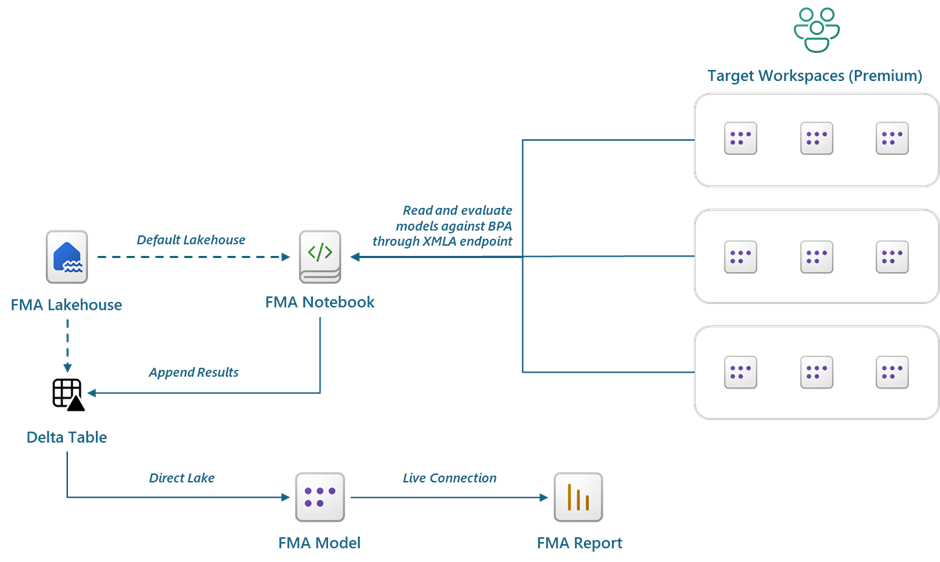
Requirements:
Limitations:
Despite being a code-based solution, the code is simple, parameterized, well-documented, and readable. Once in place, it only needs to be executed — which answers question 1 by significantly simplifying the original process.
In a Fabric-enabled workspace, the first step is to create a Lakehouse. Schemas are optional; if enabled, the Delta table will be automatically created under the dbo schema (automatically).
Next, upload the FMA Notebook to the workspace. Inside the Notebook, attach the previously created Lakehouse as the default, then update the parameters.
Parameters:
Tip: If non-Premium workspaces need to be included in the analysis, their license can be temporarily upgraded to a Premium type, so the XMLA endpoint becomes available. Once the run is complete, they can be reverted to Pro.
With everything configured, execute the Notebook. It will automatically scan all listed workspaces, validate each semantic model against the BPA rules (skipping the excluded ones), and write the results to the Delta table called modelbparesults. If the table does not yet exist, it will be created automatically in the default Lakehouse. All results are appended with a run ID, enabling historical evaluations and trend comparisons over time.
The Notebook will also create the Direct Lake semantic model connected to the Lakehouse and add the base measures. This step only needs to run once during the initial setup.
Finally, connect the provided report to the model via live connection. The report is already aligned to the model schema and includes additional measures. It is built on a white-label theme, making it straightforward to adapt to your organization’s branding and requirements.


This delivers a consistent solution for monitoring all semantic models across all validated workspaces on each run. Specific models can be excluded from analysis — the FMA model itself, for example, should always be excluded to prevent it from evaluating its own output on future runs. This answers question 4: a standardized, centralized output for enterprise-scale analysis and governance.
Fabric Model Analyzer brings the traditional Best Practice Analyzer into a modern, integrated, cloud-native solution built on Microsoft Fabric — scalable to enterprise level. It removes the dependency on external tools and flat files and introduces clear lineage and governance across the Tenant semantic models, with auditable historical results.
Future releases will focus on Custom Rules support (currently not available in the batch functions used) and enriching results with VertiPaq Analyzer output.