BI4ALL BI4ALL
  • Expertise
    • Artificial Intelligence
    • Data Strategy & Governance
    • Data Visualisation
    • Low Code & Automation
    • Modern BI & Big Data
    • R&D Software Engineering
    • PMO, BA & UX/ UI Design
  • Knowledge Centre
    • Blog
    • Industry
    • Customer Success
    • Tech Talks
  • About Us
    • Board
    • History
    • Sustainability
    • Awards
    • Media Centre
  • Careers
  • Contacts
English
Português
Last Page:
    Knowledge Center
  • Metadata Frameworks in Microsoft Fabric: YAML Deployments (Part 3)

Metadata Frameworks in Microsoft Fabric: YAML Deployments (Part 3)

Página Anterior: Blog
  • Knowledge Center
  • Blog
  • Fabric: nova plataforma de análise de dados
1 Junho 2023

Fabric: nova plataforma de análise de dados

Placeholder Image Alt
  • Knowledge Centre
  • Metadata Frameworks in Microsoft Fabric: YAML Deployments (Part 3)
10 September 2025

Metadata Frameworks in Microsoft Fabric: YAML Deployments (Part 3)

Metadata Frameworks in Microsoft Fabric: YAML Deployments (Part 3)

This is the last post in our series on metadata frameworks in Microsoft Fabric. After exploring configuration and logging, we now turn to the question of how to safely deploy YAML files across environments.

Unlike pipelines, warehouses, or notebooks, YAML configuration files are not Fabric artifacts. This means they won’t be picked up by Fabric’s native deployment pipelines. Instead, deployments need to be orchestrated externally – in our case, with Azure DevOps. (The same approach would also work in GitHub Actions.)


Creating and Organising YAML Files

If you’re developing with VS Code, the process is straightforward: you create YAML files locally, validate them with the script, and commit them into source control. This is generally the recommended practice because you get linting, schema validation, and version control all in one place.

But what if you’re working only inside Fabric UI? In that case, you still need a way to create and maintain YAML configuration files. Since Fabric UI itself doesn’t provide a native editor for YAML, you must add the configuration files directly into the repository through the Azure DevOps UI (or GitHub UI if that’s where your repo lives).

In other words:

  • VS Code = best practice with local validation before commit.
  • DevOps/GitHub UI = fallback option if you’re not using VS Code but still want to manage configs in the repo.


Why YAML Validation Matters

YAML is flexible but also notoriously sensitive to indentation and structure. Even a single misplaced space can break an entire deployment, since the code that consumes the file will be expecting very specific properties.

To reduce the risk of malformed configurations being pushed to environments, we added two safeguards before any deployment:

1.Schema Validation
We defined a JSON Schema that each YAML configuration must comply with.
Here’s a simplified snippet from the schema:


This ensures that, at a minimum, every config file declares its model name, activation flag, and defines objects in one of the framework layers (bronze, silver, gold).

2.Python Validation Script
A script checks all YAMLs against that schema


On top of that, it also runs extra validations such as dependency checks, delta processing logic, and parameter consistency.

For example, here’s how it ensures that dependencies between layers actually exist:


This way, if someone writes dependsOn: [“silver.MisspelledObject”], the validation fails before the file ever reaches DevOps.

The pipeline runs this check before anything is deployed, catching issues early.

Pro tip for developers: When working in VS Code, you can run the validation script locally before committing. It’s like running a spellcheck on your configs — except instead of catching typos in words, it catches typos that could derail your entire pipeline.


Project Structure for Environments

To keep environment-specific differences under control, the project is organized with a clear folder structure:

ConfigFiles/
├── environments/
│    ├── dev/
│    │   └── *.yml   (configurações de desenvolvimento)
│    ├── test/
│    │   └── *.yml   (configurações de teste)
│    └── prod/
│        └── *.yml   (configurações de produção)
└── scripts/
├── config-schema.json
├── validate_config.py
└── deploy-configOnelake.ps1

This layout means:

  • Each environment has its own YAML set — configs in Dev are not automatically the same as in Test or Prod.
  • The deployment pipeline respects this separation, deploying only the files inside the corresponding folder.
  • Scripts and schemas are centralised under /scripts and reused across all environments.


So, while the same deployment script runs in every stage, the inputs differ per environment. That allows controlled variations (e.g., different source paths or destinations) without hacks or manual adjustments.


Deployment Pipeline in Azure DevOps

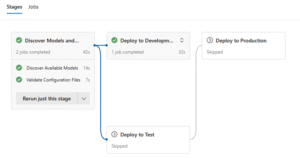
Once the validation succeeds, the pipeline moves into the actual deployment process. We structured it in four stages:

  1. Discover Models & Validate – Scans available models and runs schema validation against all YAMLs.
  2. Deploy to Development – Pushes YAMLs into the Dev environment.
  3. Deploy to Test – Promotes validated YAMLs to Test (requires manual approval before execution).
  4. Deploy to Production – Final step: pushes YAMLs into Prod (also requires manual approval to proceed).

Here’s how it looks in Azure DevOps:

This stage-based approach ensures that only validated, working YAMLs make their way into higher environments.

A key detail: the environment locations (OneLake paths, workspace names, etc.) are stored in pipeline variables. This means the same PowerShell deployment script is reused across all environments. No duplication, no environment-specific hacks — just a clean promotion path from Dev to Prod with governance built in.


Deployment into OneLake

After validation, the final deployment step is handled by a PowerShell script that pushes the configuration files into OneLake. The script takes care of uploading the validated YAMLs to the appropriate environment container.

Here’s a simplified snippet from the script:

Because workspace names and target paths are injected as variables from the pipeline, this same script works seamlessly for Dev, Test, and Prod.


Wrapping Up

With validation, environment-specific folder structure, and a multi-stage deployment pipeline, YAML configs are promoted safely and consistently across environments.

  • Invalid configs are caught early by schema + custom checks.
  • Developers can test locally in VS Code before committing (or add configs directly in DevOps UI if VS Code isn’t used).
  • Each environment has its own folder, keeping configs aligned but not identical.
  • The same script is reused across Dev, Test, and Prod (with environment variables).
  • Test and Prod deployments require approval for extra governance.

And with this, we close the metadata framework series:

  1. Part 1 — Configuration with YAML
  2. Part 2 — Logging with Eventhouse
  3. Part 3 — Deployments with Azure DevOps (this post)

What started as a set of scattered configuration tables is now a structured, validated, and automated framework running across Fabric.


 

Key Takeaways

  • YAML files aren’t Fabric artifacts — deploy them via external CI/CD (e.g., Azure DevOps).
  • Create them in VS Code (preferred) or directly in Azure DevOps UI.
  • Validate early with JSON Schema + Python script (both locally and in pipelines).
  • Add custom checks (like dependency validation) to catch subtle errors.
  • Organise configs by environment (dev, test, prod) for clean separation.
  • Use environment variables so a single script can handle all deployments.
  • Require approvals for Test and Prod to enforce governance.

Author

Rui Francisco Gonçalves

Rui Francisco Gonçalves

Senior Specialist

Share

Suggested Content

Optimising Report Creation through a Design System and Report Toolkit
Use Cases Data Visualisation

Optimising Report Creation through a Design System and Report Toolkit

BI4ALL implemented an approach based on a Design System and a Report Toolkit, designed to accelerate and standardise the report creation process.

Enable real-time data updates with a Write-Back solution in Power BI
Use Cases Data Visualisation

Enable real-time data updates with a Write-Back solution in Power BI

BI4ALL implemented a write-back solution integrated with Power BI, based on the PowerFlow Framework and supported by Power BI Transactional Task Flows. This approach enables business users to update critical data directly from Power BI reports.

Vision 2026: The complete overview of AI Trends
eBooks AI & Data Science

Vision 2026: The complete overview of AI Trends

This eBook brings together the key trends that will shape 2026, including intelligent agents, invisible AI, and physics.

The Role of Data Governance in Building a Data-Enabled Organisation
Blog Data Strategy & Data Governance

The Role of Data Governance in Building a Data-Enabled Organisation

Data governance is the backbone of a truly data-enabled organisation, turning data into a trusted, secure, and strategic asset that accelerates insight and innovation.

Enable Digital Transformation through Data Democratisation
Use Cases Data Strategy & Data Governance

Enable Digital Transformation through Data Democratisation

The creation of a decentralised, domain-oriented data architecture has democratised access and improved data quality and governance.

The Data Catalogue: Turning Governance into a Strategic Control Plane
Blog Data Strategy & Data Governance

The Data Catalogue: Turning Governance into a Strategic Control Plane

The Data Catalogue transforms Data Governance into a strategic, automated system that connects people, data, and policies to build lasting trust and value.

video title

Lets Start

Got a question? Want to start a new project?
Contact us

Menu

  • Expertise
  • Knowledge Centre
  • About Us
  • Careers
  • Contacts

Newsletter

Keep up to date and drive success with innovation
Newsletter
PRR - Plano de Recuperação e Resiliência. Financiado pela União Europeia - NextGenerationEU

2026 All rights reserved

Privacy and Data Protection Policy Information Security Policy
URS - ISO 27001
URS - ISO 27701
Cookies Settings

BI4ALL may use cookies to memorise your login data, collect statistics to optimise the functionality of the website and to carry out marketing actions based on your interests.
You can customise the cookies used in .

Cookies options

These cookies are essential to provide services available on our website and to enable you to use certain features on our website. Without these cookies, we cannot provide certain services on our website.

These cookies are used to provide a more personalised experience on our website and to remember the choices you make when using our website.

These cookies are used to recognise visitors when they return to our website. This enables us to personalise the content of the website for you, greet you by name and remember your preferences (for example, your choice of language or region).

These cookies are used to protect the security of our website and your data. This includes cookies that are used to enable you to log into secure areas of our website.

These cookies are used to collect information to analyse traffic on our website and understand how visitors are using our website. For example, these cookies can measure factors such as time spent on the website or pages visited, which will allow us to understand how we can improve our website for users. The information collected through these measurement and performance cookies does not identify any individual visitor.

These cookies are used to deliver advertisements that are more relevant to you and your interests. They are also used to limit the number of times you see an advertisement and to help measure the effectiveness of an advertising campaign. They may be placed by us or by third parties with our permission. They remember that you have visited a website and this information is shared with other organisations, such as advertisers.

Política de Privacidade