10 September 2025
Metadata Frameworks in Microsoft Fabric: YAML Deployments (Part 3)

This is the last post in our series on metadata frameworks in Microsoft Fabric. After exploring configuration and logging, we now turn to the question of how to safely deploy YAML files across environments.
Unlike pipelines, warehouses, or notebooks, YAML configuration files are not Fabric artifacts. This means they won’t be picked up by Fabric’s native deployment pipelines. Instead, deployments need to be orchestrated externally – in our case, with Azure DevOps. (The same approach would also work in GitHub Actions.)
If you’re developing with VS Code, the process is straightforward: you create YAML files locally, validate them with the script, and commit them into source control. This is generally the recommended practice because you get linting, schema validation, and version control all in one place.
But what if you’re working only inside Fabric UI? In that case, you still need a way to create and maintain YAML configuration files. Since Fabric UI itself doesn’t provide a native editor for YAML, you must add the configuration files directly into the repository through the Azure DevOps UI (or GitHub UI if that’s where your repo lives).
In other words:
YAML is flexible but also notoriously sensitive to indentation and structure. Even a single misplaced space can break an entire deployment, since the code that consumes the file will be expecting very specific properties.
To reduce the risk of malformed configurations being pushed to environments, we added two safeguards before any deployment:
1.Schema Validation
We defined a JSON Schema that each YAML configuration must comply with.
Here’s a simplified snippet from the schema:
This ensures that, at a minimum, every config file declares its model name, activation flag, and defines objects in one of the framework layers (bronze, silver, gold).
2.Python Validation Script
A script checks all YAMLs against that schema
On top of that, it also runs extra validations such as dependency checks, delta processing logic, and parameter consistency.
For example, here’s how it ensures that dependencies between layers actually exist:
This way, if someone writes dependsOn: [“silver.MisspelledObject”], the validation fails before the file ever reaches DevOps.
The pipeline runs this check before anything is deployed, catching issues early.
Pro tip for developers: When working in VS Code, you can run the validation script locally before committing. It’s like running a spellcheck on your configs — except instead of catching typos in words, it catches typos that could derail your entire pipeline.
To keep environment-specific differences under control, the project is organized with a clear folder structure:
This layout means:
So, while the same deployment script runs in every stage, the inputs differ per environment. That allows controlled variations (e.g., different source paths or destinations) without hacks or manual adjustments.
Once the validation succeeds, the pipeline moves into the actual deployment process. We structured it in four stages:
Here’s how it looks in Azure DevOps:
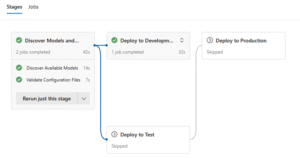
This stage-based approach ensures that only validated, working YAMLs make their way into higher environments.
A key detail: the environment locations (OneLake paths, workspace names, etc.) are stored in pipeline variables. This means the same PowerShell deployment script is reused across all environments. No duplication, no environment-specific hacks — just a clean promotion path from Dev to Prod with governance built in.
After validation, the final deployment step is handled by a PowerShell script that pushes the configuration files into OneLake. The script takes care of uploading the validated YAMLs to the appropriate environment container.
Here’s a simplified snippet from the script:
Because workspace names and target paths are injected as variables from the pipeline, this same script works seamlessly for Dev, Test, and Prod.
With validation, environment-specific folder structure, and a multi-stage deployment pipeline, YAML configs are promoted safely and consistently across environments.
And with this, we close the metadata framework series:
What started as a set of scattered configuration tables is now a structured, validated, and automated framework running across Fabric.